Blogs

Author Archive

DPDP Act 2027: Is Your Organisation Ready for India’s Data Protection Requirements?

Posted on November 25th, 2026 by Sania Afsar

Introduction

India’s digital economy is expanding quickly. Organisations collect, process and share more personal data than ever before — from customer contact details and employee records to financial information and digital identifiers.

As data volumes grow, expectations around responsible data handling are also changing. India’s Digital Personal Data Protection (DPDP) framework introduces a structured approach to how organisations collect, use, store and protect digital personal data.

For IT Heads, CIOs, CTOs and compliance teams, 2027 should not be treated as a distant deadline. It should be viewed as a practical preparation milestone.

The question is no longer whether data protection will become a business priority. The real question is:

Is your organisation ready to meet India’s data protection requirements?

What Is the DPDP Act?

The Digital Personal Data Protection Act, 2023 establishes a legal framework for processing digital personal data in India. It applies to organisations that process digital personal data within India and, in certain cases, to organisations outside India processing personal data in connection with offering goods or services to individuals in India.

The Act focuses on several important areas, including:

– Processing personal data for lawful purposes.

– Providing clear notice to individuals.

– Obtaining valid consent where required.

– Protecting personal data through reasonable security safeguards.

– Reporting personal data breaches.

– Deleting data when it is no longer required.

– Giving individuals rights over their personal data.

DPDP Rules 2025: Understanding the Implementation Timeline

The DPDP Rules, 2025 were notified on 13 November 2025. Their implementation follows a phased timeline, giving organisations different periods to prepare for specific requirements.

The key dates are:

– 13 November 2025: Rules 1, 2 and 17–21 came into force.

– 13 November 2026: Rule 4 is scheduled to come into force.

– 13 May 2027: Rules 3, 5–16, 22 and 23 are scheduled to come into force

This means organisations should not assume that every DPDP requirement starts on the same date. They should review the relevant provisions and understand which obligations apply at each stage.

For the exact provisions and commencement dates, refer to the Digital Personal Data Protection Rules, 2025 – Official Gazette.

You can also read the Government notification on the DPDP Rules, 2025 for an overview of the framework and its objectives.

For businesses, the time before May 2027 should be used to review existing data practices, identify gaps and prepare the necessary processes.

Key DPDP Requirements Every Organisation Should Prepare For
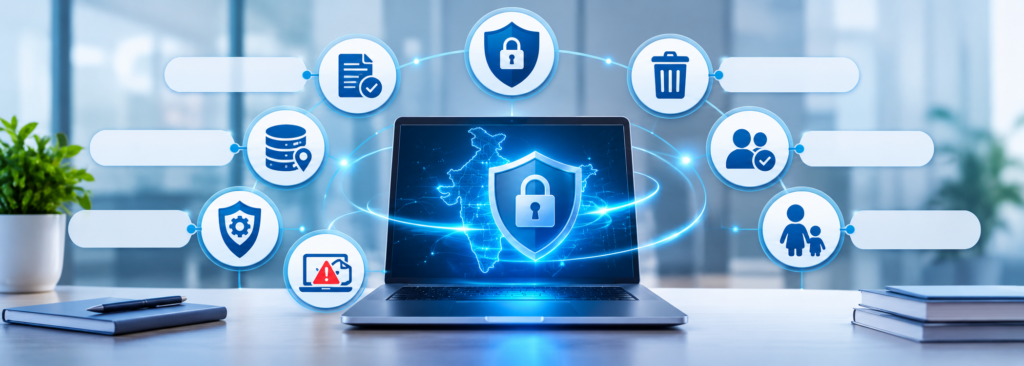
Key DPDP Requirements Every Organisation Should Prepare For

Understanding the Act is only the starting point. Organisations also need to examine how personal data is collected, accessed, stored, shared and protected across their business systems.

Here are some important areas IT and compliance teams should review.

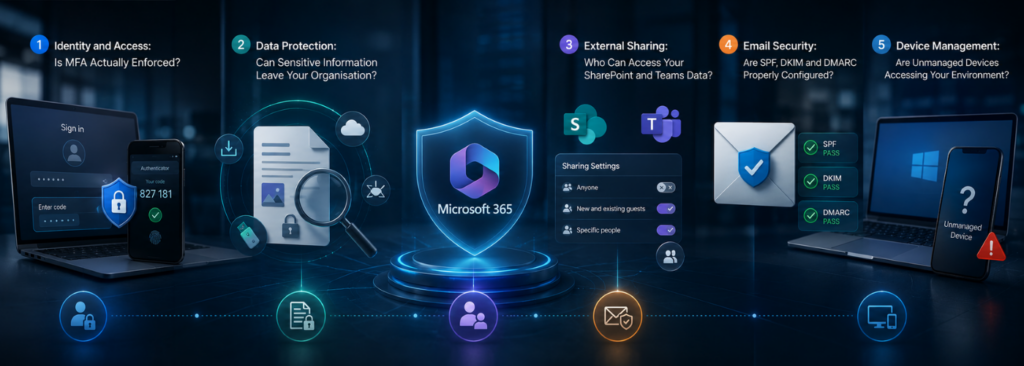
1. Review Data Collection and Consent Practices

Organisations should understand what personal data they collect, why they collect it and how it is used.

They should review whether their privacy notices clearly explain the purpose of processing and whether consent is obtained wherever required.

Businesses should also check whether personal data is being collected unnecessarily or retained without a valid purpose.

2. Identify Where Personal Data Is Stored

Personal data is often spread across multiple systems, including:

– Microsoft 365 applications such as SharePoint, OneDrive and Exchange Online.

– Customer Relationship Management (CRM) platforms.

– Enterprise Resource Planning (ERP) systems.

– HR and payroll applications.

– Cloud storage and business applications.

– Local devices and shared folders.

Without a clear understanding of where personal data resides, it becomes difficult to manage access, apply appropriate security controls or respond to requests.

Organisations should create an inventory of personal data and identify which systems, departments and users have access to it.

3. Strengthen Security Safeguards

The DPDP framework requires organisations to implement reasonable security safeguards to protect personal data against unauthorised access, use, disclosure, alteration or destruction.

IT teams should review:

– User access permissions and privileged accounts.

– Multi-factor authentication (MFA).

– Data sharing and external access settings.

– Endpoint and device security.

– Security monitoring and audit logs.

– Backup and recovery arrangements.

For organisations using Microsoft 365, reviewing existing configurations is particularly important. You can explore these Microsoft 365 security best practices IT Heads should check to identify common security gaps.

4. Prepare for Personal Data Breach Reporting

Organisations need a defined process for identifying, managing and reporting personal data breaches.

A breach response process should cover:

– How security incidents are detected and reported.

– Who is responsible for investigating incidents.

– How affected personal data is identified.

– How incidents are documented.

– How notifications are handled within applicable timelines.

The organisation should also conduct periodic reviews of its incident response process to ensure that the right teams know what to do when an incident occurs.

5. Define Data Retention and Deletion Policies

Keeping personal data indefinitely can create unnecessary security and compliance risks.

Organisations should identify how long different categories of personal data need to be retained and establish processes for deleting data when it is no longer required, subject to applicable legal retention requirements.

This includes reviewing:

– Employee and customer records.

– Archived emails and documents.

– Shared files and storage locations.

– Backup and recovery policies.

– Data held by third-party service providers.

Retention policies should be documented and applied consistently across relevant systems.

6. Establish Processes for Data Principal Rights

The DPDP Act provides individuals, referred to as Data Principals, with rights relating to their personal data.

Organisations should prepare processes to handle requests such as:

– Access to information about personal data processing.

– Correction and completion of personal data.

– Erasure of personal data, where applicable.

– Grievance redressal.

– Nomination of another individual to exercise rights in specified circumstances.

A clear process helps organisations manage requests within the applicable timelines and maintain records of how they were handled.

7. Review Children’s Personal Data

The DPDP Act includes specific requirements for processing children’s personal data.

Organisations that process children’s data should review their consent mechanisms, identify relevant age-verification requirements and understand the restrictions on certain types of processing, tracking and targeted advertising.

These requirements should be assessed according to the organisation’s activities and applicable legal provisions.

How Microsoft Purview Can Support DPDP Readiness

Microsoft Purview provides data governance, information protection and compliance capabilities that can help organisations manage and protect sensitive information across supported Microsoft environments. For businesses already using Microsoft 365, it can be part of a broader approach to improving data visibility and control. Some relevant capabilities include: Data Classification and Sensitivity Labels Organisations can use Microsoft Purview to classify information and apply sensitivity labels based on its level of confidentiality. For example, employee records, financial documents and customer information can be identified and labelled to support appropriate handling and protection. Data Loss Prevention (DLP) Data Loss Prevention policies can help identify sensitive information and reduce the risk of it being shared inappropriately. For example, organisations can configure policies to detect certain types of sensitive information and apply restrictions across supported Microsoft 365 services. Microsoft explains these capabilities in its Microsoft Purview Data Loss Prevention documentation.[VA2.1][SA2.2] Data Retention Policies and Labels Microsoft Purview retention policies and labels help organisations manage how long information is retained and when it can be deleted. These capabilities can support an organisation's documented retention strategy, provided policies are configured according to its legal and business requirements. Explore Microsoft Purview retention policies and labels to understand the available options. Auditing and Compliance Monitoring Audit capabilities help organisations record and investigate relevant activities across supported Microsoft services. These records can assist IT and compliance teams when reviewing access, investigating incidents and monitoring how information is handled. Understanding the Microsoft Security Tools Microsoft Purview is not a replacement for every Microsoft security solution. Different tools address different requirements. For example, Microsoft Defender focuses on threat protection, while Microsoft Sentinel provides security information and event management (SIEM) and security orchestration capabilities. To understand how these solutions work together, read our guide on Microsoft Purview, Defender and Sentinel. Important: Microsoft Purview can support data protection and governance activities, but deploying it does not automatically make an organisation DPDP-compliant. Organisations must also establish appropriate policies, processes, responsibilities and legal controls.

Microsoft Purview provides data governance, information protection and compliance capabilities that can help organisations manage and protect sensitive information across supported Microsoft environments.

For businesses already using Microsoft 365, it can be part of a broader approach to improving data visibility and control.

Some relevant capabilities include:

Data Classification and Sensitivity Labels

Organisations can use Microsoft Purview to classify information and apply sensitivity labels based on its level of confidentiality.

For example, employee records, financial documents and customer information can be identified and labelled to support appropriate handling and protection.

Data Loss Prevention (DLP)

Data Loss Prevention policies can help identify sensitive information and reduce the risk of it being shared inappropriately.

For example, organisations can configure policies to detect certain types of sensitive information and apply restrictions across supported Microsoft 365 services.

Microsoft explains these capabilities in its Microsoft Purview Data Loss Prevention documentation.

Data Retention Policies and Labels

Microsoft Purview retention policies and labels help organisations manage how long information is retained and when it can be deleted.

These capabilities can support an organisation’s documented retention strategy, provided policies are configured according to its legal and business requirements.

Explore Microsoft Purview retention policies and labels to understand the available options.

Auditing and Compliance Monitoring

Audit capabilities help organisations record and investigate relevant activities across supported Microsoft services.

These records can assist IT and compliance teams when reviewing access, investigating incidents and monitoring how information is handled.

Understanding the Microsoft Security Tools

Microsoft Purview is not a replacement for every Microsoft security solution. Different tools address different requirements.

For example, Microsoft Defender focuses on threat protection, while Microsoft Sentinel provides security information and event management (SIEM) and security orchestration capabilities.

To understand how these solutions work together, read our guide on Microsoft Purview, Defender and Sentinel.

Important: Microsoft Purview can support data protection and governance activities, but deploying it does not automatically make an organisation DPDP-compliant. Organisations must also establish appropriate policies, processes, responsibilities and legal controls.

Watch Our Webinar: Understanding DPDP and Microsoft Purview

Understanding India’s DPDP requirements is only the first step. Organisations also need to know how to translate these requirements into practical data protection and governance measures.

In our webinar, we discuss the key aspects of the DPDP framework and how Microsoft Purview can help organisations strengthen data protection, manage sensitive information and improve compliance readiness.

Watch the webinar to gain practical insights and understand what your organisation should consider as it prepares for DPDP requirements.

Preparing Your Microsoft 365 Environment for AI Adoption

Data protection becomes even more important as organisations introduce AI tools such as Microsoft 365 Copilot.

Copilot works with organisational data that users are already permitted to access. If SharePoint sites, OneDrive files or other information repositories have overly broad permissions, users may be able to surface information that should not be widely accessible.

Before enabling Copilot, organisations should review:

– SharePoint and OneDrive access permissions.

– External sharing settings.

– Sensitive information stored across Microsoft 365.

– Existing data classification and protection policies.

– Identity and access management controls.

– Data governance and monitoring practices.

Organisations planning AI adoption should first understand their existing data exposure. Read our guide on Microsoft 365 Copilot readiness to understand what IT teams should review before enabling Copilot.

DPDP Readiness Checklist for IT Heads and CIOs

Before the applicable DPDP requirements take effect, organisations should assess their current data protection practices.

Use this checklist as a starting point:

– Identify the personal data collected and processed by the organisation.

– Document where personal data is stored.

– Review privacy notices and consent mechanisms.

– Identify who can access sensitive information.

– Review Microsoft 365 and cloud security configurations.

– Implement appropriate data classification and protection controls.

– Establish data retention and deletion policies.

– Define personal data breach response procedures.

– Establish a process for handling Data Principal requests.

– Review third-party data processors and contractual arrangements.

– Assign responsibilities across IT, legal, HR and compliance teams.

– Conduct periodic reviews of data protection practices.

The checklist should be adapted to the organisation’s size, operations, data processing activities and applicable legal obligations.

Common Mistakes Organisations Should Avoid

Preparing for DPDP requirements is not simply a matter of purchasing a compliance tool or updating a privacy policy.

Some common mistakes include:

Assuming a privacy policy is enough: Organisations also need processes and technical safeguards to support their data protection responsibilities.

Ignoring existing data exposure: Personal information may already be accessible through shared folders, outdated permissions or unnecessary external access.

Treating all data equally: Different categories of information may require different levels of protection.

Overlooking third-party applications: Personal data may be processed by external vendors and cloud platforms, so these relationships should also be reviewed.

Waiting until 2027: Delaying preparation can leave IT teams with limited time to identify and address gaps.

Assuming technology guarantees compliance: Tools such as Microsoft Purview can support specific controls, but legal and organisational responsibilities remain with the organisation.

Steps to Take Before May 2027

Organisations do not need to address every requirement at once. A phased approach can make preparation more manageable.

Step 1: Understand your data environment

Identify what personal data your organisation processes, where it resides and which systems handle it.

Step 2: Review existing security controls

Assess identity management, user permissions, data sharing, endpoint protection and monitoring.

Step 3: Identify compliance gaps

Compare existing practices against the applicable DPDP Act and Rules requirements. Involve legal and compliance teams where interpretation is needed.

Step 4: Strengthen data governance

Establish clear policies for classification, access, retention, deletion and third-party data processing.

Step 5: Test your response processes

Review how your organisation handles personal data breach notifications, Data Principal requests and internal escalation.

Step 6: Review and improve regularly

Data protection is an ongoing responsibility. Regular reviews can help ensure that security controls and processes remain aligned with changing business and regulatory requirements.

Is Your Organisation Ready for DPDP Requirements?

India’s DPDP framework makes responsible personal data handling an important business responsibility. Organisations should use the time before the 2027 implementation milestones to review their existing practices, improve security controls and establish clear data governance processes.

For IT Heads, CIOs and CTOs, this is also an opportunity to address existing security gaps and build a more controlled Microsoft 365 environment.

Review Your Microsoft 365 Security Before 2027

Not sure whether your Microsoft 365 environment is adequately protected?

Mismo Systems helps organisations review their Microsoft 365 security configuration, identify potential gaps and strengthen their security posture.

FAQs

The Digital Personal Data Protection Act, 2023 is India’s data protection legislation that establishes requirements for processing digital personal data. It defines responsibilities for organisations handling personal data and provides rights to individuals whose data is processed.

The Act and its associated Rules have a phased commencement schedule. The DPDP Rules, 2025 were notified on 13 November 2025. Rule 4 is scheduled to commence on 13 November 2026, while Rules 3, 5–16, 22 and 23 are scheduled to commence on 13 May 2027. Organisations should review the official commencement notifications for the applicable dates.

The Act applies to organisations processing digital personal data within India. It can also apply to processing outside India when it is connected with offering goods or services to individuals in India, subject to the Act’s scope and provisions.

Microsoft Purview offers capabilities such as data classification, sensitivity labels, Data Loss Prevention, retention management and auditing. These can support an organisation’s data protection and governance processes, but they do not independently guarantee DPDP compliance.

Yes. Employee information is personal data. Organisations processing employee records digitally should review their data collection, access, protection, retention and processing practices in line with applicable requirements and exemptions.

Organisations should identify personal data, review existing security controls, establish data retention and deletion practices, prepare breach response procedures and develop processes for handling Data Principal requests. They should also assess their third-party data processing arrangements.

No. The DPDP Act does not mandate the use of Microsoft Purview. Organisations can choose appropriate technologies and processes to meet their obligations. Purview is one option for supporting information protection, data governance and compliance activities within supported Microsoft environments.


Before Enabling Copilot, Is Your Microsoft 365 Environment Ready for AI?

Posted on October 30th, 2026 by Sania Afsar

Why Microsoft 365 Security Readiness Matters Before Enabling Copilot

Microsoft 365 Copilot can help employees summarise meetings, find information, draft documents and work across business data. For IT teams, however, enabling Copilot involves more than assigning licences and showing employees how to use it.

The bigger question is whether the organisation’s existing data and security controls are ready for AI.

Consider a common situation. An employee can access a SharePoint folder containing confidential financial reports because the folder was shared with a large group several years ago. The access was never reviewed because nobody considered it a major risk. When Copilot is introduced, the employee may be able to find and summarise information from those files through a simple prompt.

Copilot hasn’t necessarily bypassed security. It may be using information the employee was already permitted to access. The problem is that the original permissions were too broad.

This is why Microsoft recommends reviewing data access, addressing oversharing and establishing appropriate security and governance controls before deploying Copilot.

Organisations can start by reviewing their existing Microsoft 365 security and governance controls before expanding AI access.”

For IT Heads and CTOs, the priority is clear: make sure your Microsoft 365 environment is ready for AI before making AI available across the business.

What Does AI Readiness Mean for Microsoft 365 Security?

This article focuses on the security and governance aspects of Microsoft 365 Copilot readiness. Licensing and technical requirements also need to be checked as part of deployment planning.

AI readiness means having the right data, permissions, security controls and governance processes in place to use AI safely within the organisation.

For Microsoft 365 Copilot, this includes reviewing who can access business information, how sensitive data is protected, whether existing sharing arrangements are appropriate and how AI usage will be monitored.

Copilot works with information available to the user through supported Microsoft 365 services and respects existing permissions and applicable security controls. It doesn’t automatically correct outdated access rights, clean up old files or decide whether an employee should have access to a particular document.

That distinction matters.

An organisation may already have Microsoft 365, multi-factor authentication and endpoint protection in place and still have gaps in its data governance. For example, confidential

documents might be stored in broadly accessible SharePoint sites, or former project folders might remain available long after the project has ended.

These issues deserve attention before Copilot is introduced.

Microsoft’s guidance on building a secure and governed foundation for Copilot provides a useful starting point for this work.

5 Microsoft 365 Security Checks to Complete Before Enabling Copilot

5 Microsoft 365 Security Checks to Complete Before Enabling Copilot
1. Review SharePoint, OneDrive and Teams Permissions

Start by understanding who can access the organisation’s information.

Over time, permissions can become difficult to manage. Employees move between departments, project groups change, external collaborators come and go, and old sharing links remain active. In some cases, access is granted to a much larger group than the business intended.

Before enabling Copilot, review:

– SharePoint sites and libraries with broad access permissions.

– OneDrive files and folders shared with colleagues or external users.

– Teams and Microsoft 365 groups with outdated membership.

– Anonymous or organisation-wide sharing links, where enabled.

– Sites with broken permission inheritance or unclear ownership.

– Access to confidential HR, finance, legal and customer information.

Pay particular attention to whether permissions still reflect how the business operates today.

For example, a finance

a finance folder may have been shared with an entire department when only a small group of employees needed access. Copilot makes information easier to discover, so correcting that permission before rollout is a sensible first step.

Microsoft provides guidance on preparing SharePoint for Copilot and identifying oversharing risks.

What IT leaders should ask: Can we confidently explain who has access to our sensitive business information, and why?

2. Identify Sensitive, Outdated and Unmanaged Data

Permissions are only part of the problem. Organisations also need to understand what information they hold and whether it is still needed.

A typical Microsoft 365 environment can contain years of accumulated documents, duplicate files, outdated policies, old project folders and content with no clear owner. Some of it may be harmless, while other material could contain personal information, financial records or confidential

business details.

Before a Copilot rollout, identify content that is:

– Sensitive but not adequately protected.

– Accessible to more users than necessary.

– Outdated, duplicated or no longer required.

– Stored in inactive or ownerless SharePoint sites.

– Missing a clear classification or retention approach.

The goal isn’t to delete everything old. Some records must be retained for legal, regulatory or business reasons. Instead, decide what should be retained, archived, restricted or removed according to the organisation’s policies.

Microsoft Purview and SharePoint Advanced Management offer capabilities that can help administrators assess data risks and identify sites requiring attention. Available features depend on the organisation’s licensing and configuration.

For further guidance, see Microsoft’s secure and governed data foundation for Copilot.

What IT leaders should ask: Do we know where our sensitive information lives, who owns it and how long it should remain accessible?

3. Put Data Protection Controls in Place

Once the organisation understands its data and permissions, the next step is 

is to make sure sensitive information has appropriate protection.

Microsoft Purview can help organisations classify information, apply sensitivity labels, enforce Data Loss Prevention (DLP) policies and support compliance and auditing requirements.

For example, a business might classify financial forecasts as confidential and customer records as restricted. Appropriate policies can then help control how that information is shared and, where supported and configured, how Copilot can process it.

The important point is that purchasing Microsoft 365 Copilot does not replace the need for a data protection strategy.

IT teams should review:

– Whether sensitivity labels are defined and applied consistently.

– Whether DLP policies cover relevant sensitive information.

– Whether policies address applicable Copilot interactions and data sources.

– Whether retention, auditing and investigation requirements are understood.

– Whether the controls have been tested against real business scenarios.

Organisations should also check which capabilities are available under their current Microsoft 365 and Purview licences before designing the rollout.

Microsoft explains the available controls in its guide to security for Microsoft Copilot.

What IT leaders should ask: If an employee uses Copilot to work with sensitive information, do our existing policies provide the protection and oversight we need?

4. Check Identity, Access and Device Security

Copilot doesn’t operate separately from the organisation’s wider Microsoft 365 security environment. Its safe use depends in part on the identity, access and device controls already in place.

A strong starting point is to review Microsoft Entra ID, multi-factor authentication (MFA), Conditional Access and least-privilege access. IT teams should also check device compliance, endpoint protection and relevant threat detection controls.

The review should establish whether:

– MFA and appropriate authentication policies are enforced.

– Administrative privileges are limited to those who need them.

– Access policies reflect user, device and sign-in risk where appropriate.

– Managed devices meet the organisation’s security requirements.

– Microsoft Defender and other relevant security controls are configured and monitored.

Businesses looking to strengthen these controls can explore Mismo’s identity and access management solutions

The exact controls will vary by organisation, existing security maturity and licensing. A mid-market business doesn’t necessarily need to implement every advanced security feature before starting a pilot, but it should understand its gaps and prioritise the controls that protect its users and data.

Microsoft’s Zero Trust guidance for Microsoft 365 Copilot explains how identity, data protection, device security and access permissions fit into Copilot readiness.

What IT leaders should ask: Are our identity and access controls strong enough to protect the information Copilot can help employees find and use?

5. Establish Governance Before Expanding Copilot Access

Even with the right technical controls, organisations need clear rules for how Copilot will be introduced and used.

Employees should understand which business use cases are approved, what information requires extra care and when AI-generated content needs human review. IT teams need to know who is responsible for security decisions, policy management and investigating potential issues.

Ongoing support and reviews are also important after deployment. Learn more about Mismo’s Microsoft 365 managed services

A practical rollout should include:

– A defined business purpose and a small initial group of users.

– Clear guidance on acceptable AI use and sensitive information.

– Testing of permissions and protection controls before wider deployment.

– Appropriate audit logging, monitoring and incident response processes.

– Regular reviews of data exposure, access rights and policy effectiveness.

Start with use cases that provide genuine value without creating unnecessary risk. For example, summarising internal meetings or drafting routine business communications may be suitable pilot activities, provided the relevant data and permissions have been reviewed.

Use the pilot to identify problems, gather feedback and refine policies before extending access across departments.

Microsoft’s Copilot adoption guidance provides additional advice on preparing the tenant, selecting initial use cases and organising a rollout.

What IT leaders should ask: Do we have a clear plan to manage Copilot securely after the initial deployment, rather than treating readiness as a one-time exercise?

Microsoft 365 Copilot Readiness Checklist

Before enabling Copilot for a wider group of employees, IT teams can use the following checklist to review the essentials.

Readiness Area What to Check
Permissions Review SharePoint, OneDrive and Teams access; remove unnecessary permissions and sharing links.
Data Governance Identify sensitive, outdated, inactive and ownerless content.
Information Protection Review sensitivity labels, DLP, retention and applicable compliance controls.
Identity and Devices Validate MFA, Conditional Access, privileged access and device protection.
Governance and Monitoring Define approved use cases, pilot users, audit requirements and ongoing reviews.

This checklist is a starting point, not a guarantee of readiness. Organisations should validate controls against their own data, regulatory obligations, Microsoft 365 configuration and licensing.

Do You Need to Fix Everything Before Enabling Copilot?

Not necessarily. The objective is to identify and address the risks that could expose sensitive information or undermine the organisation’s security requirements.

A practical approach is to assess the current environment, prioritise high-risk content and permissions, apply temporary protections where appropriate, and remediate the underlying issues. The organisation can then validate the controls and expand the rollout in stages.

For example, a business might discover that several SharePoint sites contain sensitive information but are accessible to broad employee groups. Rather than enabling Copilot for everyone immediately, the IT team can review those sites, restrict access where needed and test the results before expanding deployment.

This approach allows organisations to make progress without overlooking security.

Microsoft’s secure and governed Copilot deployment guidance covers oversharing remediation, ongoing guardrails and regulatory considerations.

How Mismo Systems Can Help Prepare Your Microsoft 365 Environment

How Mismo Systems Can Help Prepare Your Microsoft 365 Environment

Preparing for Copilot is a useful opportunity to review the wider Microsoft 365 security environment, not just the AI deployment itself.

Mismo Systems helps organisations assess and strengthen their Microsoft 365 security, identity and data protection controls. This can include reviewing access permissions, identifying potential data exposure, evaluating Microsoft Purview capabilities and recommending practical improvements based on the organisation’s requirements.

For mid-market businesses, the objective is to establish a manageable security foundation that supports business productivity without losing sight of data protection and governance.

If your organisation is planning a Copilot rollout, start by understanding where your current environment stands and which gaps need attention.

Planning to enable Microsoft 365 Copilot? Review your security and data governance readiness before rolling it out across the business.

Final takeaway

Microsoft 365 Copilot can make everyday work easier, but the quality of the security and governance behind it matters. Reviewing permissions, protecting sensitive information and establishing clear controls before deployment helps organisations adopt AI with greater confidence.

FAQs

Microsoft 365 Copilot readiness means ensuring that an organisation’s data, access permissions, identity controls, information protection policies and governance processes are suitable for using Copilot securely. It also includes checking licensing, technical requirements and the organisation’s ability to monitor and manage the rollout.

Copilot can use information that a signed-in user is authorised to access. If SharePoint sites or files have overly broad permissions, Copilot may make that information easier for those users to find. Reviewing permissions helps reduce unintended exposure before deployment.

Not every organisation needs every Purview capability to begin using Copilot. However, Microsoft Purview provides important information protection, DLP, auditing and compliance capabilities that can support a secure deployment. The specific features available depend on licensing, configuration and business requirements.

Depending on the supported workload, licence and policy configuration, Microsoft Purview DLP and information protection controls can restrict Copilot’s use of certain sensitive content or interactions. Organisations should configure and test the relevant policies rather than assume that all sensitive data is automatically blocked.

One major risk is oversharing: employees may already have access to information that they should not need for their roles. Copilot can make this information easier to discover. Other considerations include sensitive data protection, identity security, compliance, user behaviour and ongoing monitoring.

Yes, provided it first assesses its risks and addresses the gaps that could create unacceptable exposure. A phased rollout can help an organisation prioritise high-risk permissions and data, validate essential controls and expand usage as its security and governance arrangements mature.

Start with data access and oversharing, particularly in SharePoint and OneDrive. Then review sensitive data protection, identity and device controls, compliance requirements and monitoring. These checks help IT teams identify the most important issues before assigning Copilot licences to a wider group of users.

What Is an Enterprise AI Assistant and How Does It Work?

Posted on October 29th, 2026 by Sania Afsar

The Growing Challenge of Accessing Enterprise Information

Every organization runs on multiple systems.

Customer information lives in CRM platform. Financial data resides in ERP systems. Operational insights are spread across dashboards and databases.

Important knowledge often sits inside documents, emails, and collaboration tools.

As businesses grow, so does the complexity of accessing information.

Employees spend a significant amount of time switching between applications, searching for reports, and requesting information from different teams. Leaders often have the data they need, but finding the right answer at the right time can still be difficult.

What if employees could simply ask:

And receive accurate answers instantly?

Leaders are increasingly using AI assistants to get instant answers to critical business questions. Explore these 10 business questions every leader should ask an AI assistant to see how conversational intelligence supports better decision-making.

This is exactly what an Enterprise AI Assistant is designed to do.

Enterprise AI assistants are transforming the way organizations interact with data, applications, and knowledge. Rather than navigating multiple systems, users can access information through natural language conversations, making enterprise intelligence more accessible than ever before.

In this guide, we’ll explore what an enterprise AI assistant is, how it works, the technologies behind it, and why it is becoming an essential part of modern business operations.

What Is an Enterprise AI Assistant?

An Enterprise AI Assistant is an AI-powered platform that enables employees to interact with business applications, enterprise data, and organizational knowledge through natural language conversations.

Instead of manually searching through reports or switching between systems, users can ask questions and receive contextual answers instantly.

For example:

– Show me sales performance for the last six months.

– Which customers are at risk of churn?

– What is the status of pending purchase orders?

– Summarize our operational performance this quarter.

The assistant understands the request, retrieves information from connected systems, analyzes relevant data, and delivers meaningful responses.

Unlike consumer AI chatbots that answer general questions, enterprise AI assistants are built specifically for business environments. They securely connect to enterprise applications and deliver information tailored to organizational needs.

Think of an enterprise AI assistant as an intelligent layer that sits across your business systems and enables people to access information simply by having a conversation.

To see a real-world example of how an enterprise AI assistant connects business data, applications, and knowledge into a single conversational experience, explore Cazper, an AI-powered Business Intelligence Assistant.

Why Enterprise AI Assistants Are Becoming Essential

Organizations today generate enormous amounts of information every day.

Data exists across:

– ERP systems

– CRM platforms

– Financial applications

– Data warehouses

– Customer support tools

– Collaboration platforms

– Documents and knowledge repositories

Despite this abundance of information, employees often struggle to find answers quickly.

Several challenges are driving the adoption of enterprise AI solutions.

1. Information Is Fragmented

Business information rarely exists in one place. Employees frequently need to access multiple systems to answer a single question.

2. Decision-Making Needs to Be Faster

Markets change rapidly. Leaders need immediate access to insights to respond effectively.

3. Employees Expect Consumer-Like Experiences

People are increasingly accustomed to conversational interfaces and expect enterprise systems to be equally intuitive.

4. Businesses Want Greater Productivity

Teams spend too much time searching for information rather than acting on it.

5. Data Should Be Accessible to Everyone

Information should not be limited to technical teams or business analysts. Every employee should be able to access insights when needed.

Enterprise AI assistants address these challenges by making enterprise information easier to access and use.

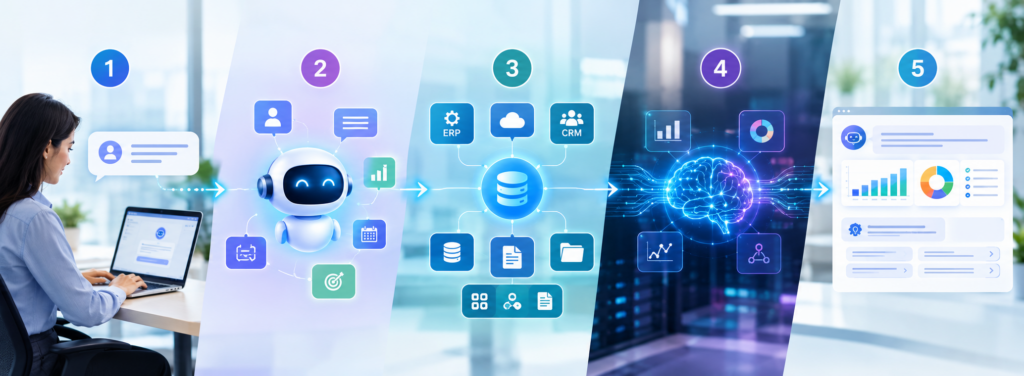
How Does an Enterprise AI Assistant Work?

How Does an Enterprise AI Assistant Work

Although using an enterprise AI assistant feels simple, sophisticated technologies operate behind the scenes.

Step 1: The User Asks a Question

The interaction begins with a natural language question.

For example:

“Which products generated the highest revenue last quarter?”

Step 2: The Assistant Understands Intent

Using Natural Language Processing (NLP), the assistant interprets:

– User intent

– Business terminology

– Relevant metrics

– Time periods

–  Context

The system understands not just words, but what the user is trying to achieve.

Step 3: Information Is Retrieved

The assistant securely connects to business systems, including:

– ERP applications

– CRM platforms

– Databases

– Data warehouses

– Documents and knowledge bases

– Business applications

Relevant information is gathered from these sources.

Step 4: The Information Is Processed

Artificial intelligence analyzes the data, performs calculations, identifies relationships, and generates insights.

Step 5: A Response Is Delivered

The assistant presents information in a conversational format, often including:

– Direct answers

– Summaries

– Charts and visualizations

– Recommendations

– Suggested follow-up questions

The entire experience feels similar to having a conversation with an intelligent business analyst.

Core Technologies Behind Enterprise AI Assistants

Modern enterprise AI assistants combine multiple technologies to deliver intelligent experiences.

Large Language Models (LLMs)

Large Language Models help the assistant understand natural language and generate human-like responses.

Natural Language Processing (NLP)

NLP enables the assistant to interpret questions, understand context, and recognize business terminology.

Retrieval-Augmented Generation (RAG)

RAG allows the assistant to retrieve information from enterprise systems and knowledge repositories before generating responses.

This improves accuracy and ensures answers are grounded in organizational data.

Machine Learning

Machine learning algorithms identify patterns, improve recommendations, and enhance the assistant’s capabilities over time.

Data Integration Frameworks

Integration technologies connect the assistant with ERP systems, CRM applications, databases, and other enterprise platforms.

Together, these technologies make enterprise AI assistants capable of delivering contextual and reliable business intelligence.

Enterprise AI Assistant Architecture

While implementations vary, most enterprise AI assistants include five core layers.

Conversational Interface

The user interacts through chat interfaces, web applications, mobile apps, or collaboration platforms.

Intelligence Layer

AI models process requests, understand intent, and generate responses.

Data Integration Layer

Connectors securely access information from enterprise systems.

Security and Governance Layer

Authentication, authorization, and access controls ensure users only view permitted information.

Analytics and Monitoring Layer

Administrators monitor usage, performance, and adoption while continuously improving the assistant.

This architecture allows organizations to unify information from multiple systems into a single conversational experience.

Enterprise AI Assistant Use Cases Across Industries

Finance

Finance teams use enterprise AI assistants to:

Sales

Sales organizations use AI assistants to:

Manufacturing

Manufacturers use enterprise AI assistants to:

Retail

Retail businesses use AI assistants to:

Healthcare

Healthcare organizations use enterprise AI solutions to:

Regardless of industry, the goal remains the same: make information easier to access and transform data into actionable intelligence.

Enterprise AI Assistant vs Chatbots vs Conversational Analytics

Enterprise AI Assistant vs Chatbots vs Conversational Analytics

These terms are often used interchangeably, but they serve different purposes.

Capability Traditional Chatbots Conversational Analytics Enterprise AI Assistant
Purpose Answer predefined questions Deliver business insights Provide enterprise-wide intelligence
Data Access Limited Analytics and reporting systems ERP, CRM, databases, documents, and applications
User Experience Rule-based interactions Conversational data analysis Enterprise-wide conversational experiences
Decision Support Minimal Moderate High
Workflow Support Limited Limited Advanced

Think of it this way:

A traditional chatbot answers simple questions.

Conversational analytics helps users explore and understand business data.

An enterprise AI assistant goes a step further by becoming a unified intelligence layer that connects enterprise systems, knowledge, and business processes.

In many organizations, conversational analytics operates as one capability within a broader enterprise AI assistant.

Security and Governance Considerations

Enterprise information is highly sensitive, making security a critical requirement.

Modern enterprise AI assistants incorporate several security measures.

Role-Based Access Controls

Users can only access information relevant to their responsibilities.

Authentication and Identity Management

Integration with enterprise identity systems ensures secure access.

Data Privacy and Compliance

Organizations can enforce governance policies and regulatory requirements.

Audit and Monitoring

Activity logs provide visibility into system usage and support compliance initiatives.

Security and governance capabilities are often the deciding factors when organizations evaluate enterprise AI solutions.

The Future of Enterprise AI Assistants

The way businesses interact with information is changing rapidly.

Employees increasingly expect immediate access to information without navigating multiple applications or waiting for reports.

Enterprise AI assistants are helping organizations meet these expectations by creating a more intuitive and conversational experience.

In the coming years, enterprise AI assistants are expected to:

– Become deeply integrated across enterprise applications

– Deliver increasingly personalized experiences

– Support predictive and proactive decision-making

– Automate routine workflows and actions

– Make enterprise intelligence accessible to every employee

Rather than replacing existing business systems, enterprise AI assistants will increasingly serve as the unified interface through which people access information and interact with enterprise technology.

The Future of Enterprise Intelligence Is Conversational

Organizations do not lack information. They often lack an efficient way to access and use it.

Enterprise AI assistants bridge this gap by enabling employees to interact with business systems, applications, and knowledge through natural language conversations.

Instead of searching through multiple systems and waiting for reports, teams can simply ask questions and receive answers instantly.

As organizations continue to embrace digital transformation and data-driven decision-making, enterprise AI assistants are becoming an essential layer of modern enterprise technology.

Discover Cazper

Cazper enables organizations to access business insights through natural language conversations by connecting enterprise data, applications, and knowledge into a unified conversational experience. Empower your teams to find answers faster, make smarter decisions, and unlock the full value of enterprise information.

Ready to experience conversational business intelligence? Start your Free Cazper Trial and see how quickly your teams can access insights across enterprise systems.

FAQs

An Enterprise AI Assistant is an AI-powered platform that enables employees to interact with business applications, enterprise data, and organizational knowledge through natural language conversations.

It uses technologies such as large language models, natural language processing, machine learning, and secure data integrations to understand questions, retrieve information, analyze data, and provide responses conversationally.

Key benefits include faster access to information, improved productivity, better decision-making, greater data accessibility, and reduced dependency on manual reporting.

Yes. Modern enterprise AI assistants can securely integrate with ERP platforms, CRM systems, databases, knowledge repositories, and business applications.

No. Businesses of all sizes can benefit from enterprise AI assistants, particularly organizations looking to improve productivity and make information more accessible.

Microsoft Purview vs Defender vs Sentinel: What’s the Difference?

Posted on October 15th, 2026 by Sania Afsar

Three Microsoft Security Solutions, Three Different Roles

Microsoft Purview, Microsoft Defender, and Microsoft Sentinel are three names that frequently appear together when organisations discuss Microsoft security. But they do not solve the same problem.

That can make it difficult for IT leaders and business decision-makers to understand where each platform fits.

– Is Microsoft Purview an endpoint security tool?
– Is Microsoft Defender a SIEM?
– Do you need Microsoft Sentinel if you already have Microsoft Defender?
– And where does data protection fit into the overall security strategy?

The simplest way to understand the difference is this: Microsoft Purview focuses on your data. Microsoft Defender focuses on threats and attacks. Microsoft Sentinel focuses on security monitoring, investigation, and response across your wider environment.

These platforms can work together, rather than being alternatives to one another. Microsoft specifically describes Defender XDR and Sentinel as complementary technologies, with Defender providing extended detection and response and Sentinel providing SIEM capabilities.

Understanding these differences can help organisations build a more structured Microsoft security environment and avoid treating every security challenge as the same problem.

Microsoft Purview: Protecting and Governing Your Data

Think about the information your organisation handles every day.

– Customer Information

– Financial Records

– Contracts

– Employee Information 

– Business reports

– Intellectual property

– Emails and documents

The first security question is not necessarily, “Is someone attacking us?”

It can be: “What sensitive data do we have, where is it located, and who should be able to access or share it?”

This is where Microsoft Purview comes into the picture.

Microsoft Purview provides data security and information protection capabilities that help organisations discover, classify, protect, and govern sensitive information across different environments.

What does Microsoft Purview do?

Purview can help organisations understand their data and apply appropriate controls around it.

For example, an organisation may have sensitive information stored across:

– Microsoft SharePoint

– OneDrive

– Microsoft Teams

– Exchange Online

– End-user devices

– Cloud applications

– Other data sources

Without appropriate classification and protection, sensitive information can easily be copied, shared, downloaded, or sent to the wrong person.

Purview provides capabilities such as sensitivity labels, Data Loss Prevention (DLP), information protection, data security posture management, and insider risk management to help organisations address these challenges.

For example, sensitivity labels can help identify information based on its level of sensitivity and apply protection policies accordingly.

DLP can help organisations identify and control activities involving sensitive information.

This makes Purview particularly relevant when the business question is: “How do we protect our information and control how sensitive data is used?”

A simple way to think about Purview

Data → Discover → Classify → Protect → Govern

Purview is therefore less about identifying whether a laptop has malware and more about understanding and protecting the information that matters to the business.

Microsoft Defender: Protecting Against Threats

Now consider a different scenario. An employee receives a suspicious email. They click a malicious link. Their credentials are compromised. The attacker attempts to access another application. Suspicious activity begins appearing across the environment. This is where Microsoft Defender becomes important.

Microsoft Defender XDR is designed to provide extended detection and response across areas such as endpoints, email, applications, and identities. It automatically collects, correlates, and analyses security signals to help security teams detect and respond to threats.

Instead of looking at every security alert separately, Defender XDR can connect related signals and provide a broader view of an incident.

What does Microsoft Defender protect?

What does Microsoft Defender protect

The Defender ecosystem includes different security capabilities for different parts of the environment.

Depending on the Microsoft Defender services deployed and licensed in the environment, protection can extend across:

– Endpoints and devices

– Email

– Identities

– Cloud applications

– Microsoft 365 environments

– Cloud workloads

For example, Microsoft Defender for Endpoint focuses on endpoint security, while Microsoft Defender XDR brings signals from multiple security domains together.

The objective is to move beyond simply detecting individual alerts. Instead, security teams can investigate how different signals may be connected.

Why does this matter?

Imagine an organisation receives five separate alerts:

– A suspicious login

– An unusual email

– A potentially compromised endpoint

– A suspicious PowerShell activity

– An attempt to access a business application

Looking at these individually could make them appear unrelated. But when they are correlated, they may represent different stages of the same attack. That broader context is one of the key ideas behind Extended Detection and Response, or XDR.

Microsoft describes Defender XDR as an XDR solution that correlates security signals across Microsoft 365 services and can help security teams investigate and respond to threats.

A simple way to think about Defender

Threat → Detection → Investigation → Response

If the question is: “Are our users, devices, applications, or identities being targeted by a threat?”

Microsoft Defender is a major part of the answer.

Microsoft Sentinel: Seeing the Bigger Security Picture

Now imagine that your organisation has more than just Microsoft 365.

Perhaps you also use:

– Azure

– Firewalls

– Network appliances

– Business applications

– Third-party cloud platforms

– SaaS applications

– Infrastructure from different vendors

– Security tools from multiple providers

Your security team now has information coming from many different places.

This creates another challenge: How do you bring those signals together and understand what is actually happening across the environment?

This is where Microsoft Sentinel fits.

Microsoft Sentinel is Microsoft’s cloud-native Security Information and Event Management (SIEM) platform. It can collect security information from different sources, correlate signals, support investigation, and help organisations respond to threats. It also supports multicloud and multiplatform environments.

Microsoft Sentinel is also transitioning fully to the Microsoft Defender portal, with the Azure portal experience scheduled to retire on 31 March 2027. Organisations still managing Sentinel through the Azure portal should plan their migration to ensure a smooth transition.

How Microsoft Purview, Defender and Sentinel Work Together

This is where the conversation becomes more interesting.

A modern security strategy is rarely about deploying one tool and expecting it to solve every security problem.

Instead, different security capabilities can work together.

Consider a simple example.

Step 1: Sensitive information is identified

An organisation uses Microsoft Purview to identify and classify sensitive information.

For example, certain documents may contain financial or personal information.

Policies can then be applied to help protect that information.

Step 2: A suspicious activity occurs

An employee’s credentials are compromised.

The attacker attempts to access business resources.

Microsoft Defender can detect suspicious activity across relevant identities, endpoints, email, and applications.

Step 3: Security signals are correlated

Other suspicious activity is detected in the environment.

Microsoft Sentinel can collect security data from Microsoft and non-Microsoft sources, helping security teams monitor and investigate activity across the wider environment. In the Microsoft Defender portal, Sentinel is integrated into a unified security operations experience, where Sentinel and Defender capabilities work together through shared incident management.

When Microsoft Sentinel is onboarded to the Defender portal, its incidents are managed through the Defender portal’s unified incident experience. Alerts from Sentinel can be correlated with Defender signals, allowing related activity to be together for investigation.

The result is a more connected security approach:

Purview → Discover, classify, protect and govern data
Defender → Detect, investigate and respond to threats
Sentinel → Collect, analyse and orchestrate security operations across the environment

This is why organisations should not necessarily ask, “Which one should we choose?”

A more useful question can be: “Which security problems do we need to address, and how should these capabilities work together?”

A Real-World Example

Consider a company with 500 employees using Microsoft 365, Azure, laptops, SaaS applications, and a mixture of cloud and on-premises systems.

The company has three different challenges.

Challenge 1: Sensitive documents are being shared externally

Employees regularly share documents through Teams, SharePoint and email.

The IT team is concerned about sensitive business information leaving the organisation.

This is primarily a data security and information protection challenge.

Microsoft Purview can be relevant here.

The organisation can use capabilities such as classification, sensitivity labels and DLP policies to help identify and protect sensitive information.

Challenge 2: Employees are receiving sophisticated phishing emails

One employee clicks a malicious link.

An endpoint begins showing suspicious behaviour.

The user’s identity also shows unusual activity.

This becomes a threat detection and response challenge.

Microsoft Defender XDR can bring together signals from relevant security services and help security teams investigate the incident.

Challenge 3: Security information is spread across multiple platforms

The organisation also has firewall logs, Azure activity, third-party applications and other infrastructure generating security events.

The security team needs a centralised way to analyse these signals.

This is where Microsoft Sentinel can provide SIEM capabilities and broader security visibility.

The three technologies therefore address different parts of the same overall security strategy.

Why the Difference Matters for IT Leaders

For IT leaders, understanding these distinctions is not just about knowing Microsoft’s product portfolio.

It is about making sure security investments address actual business risks.

An organisation may have strong endpoint protection but limited visibility into sensitive data.

Another may have good data classification but limited centralised security monitoring.

Another may have multiple security tools but no effective way to correlate the information they generate.

Security maturity is therefore not simply about having more tools.

It is about whether the tools work together to address the organisation’s actual risks.

Microsoft’s guidance highlights the complementary relationship between Defender XDR and Sentinel, including their integration for unified security operations.

The same principle applies when considering data protection.

Security teams need visibility into both what attackers are doing and what information they could potentially access or compromise.

Final Thoughts

Microsoft Purview vs Microsoft Defender vs Microsoft Sentinel - Key differences

Microsoft Purview, Microsoft Defender and Microsoft Sentinel are often discussed together because they can contribute to a connected Microsoft security environment. But their primary purposes are different.

Purview is centred around data security and information protection.

Defender is centred around threat detection, investigation and response.

Sentinel is centred around SIEM capabilities and broader security monitoring.

The goal should not simply be to deploy all three because they are available within the Microsoft ecosystem. Instead, organisations should first understand their security priorities and then determine where each technology fits.

Mismo Systems is a Microsoft Solutions Partner for Security, helping organisations strengthen their security posture across Microsoft 365, cloud, identity, endpoints, and data. With expertise across Microsoft Purview, Microsoft Defender, Microsoft Sentinel, Entra ID, Intune, and Microsoft 365 security, we help businesses build practical and connected security environments aligned with their needs.

For some organisations, the immediate priority may be understanding and protecting sensitive data.

For others, it may be strengthening endpoint and identity threat protection.

For organisations with complex environments, centralised security monitoring and SIEM capabilities may be a major requirement.

And in many environments, these needs overlap. That is where the combination becomes valuable.

Purview helps answer: “What data are we protecting?”

Defender helps answer: “What threats are we facing?”

Sentinel helps answer: “What is happening across our security environment?”

Understanding these three questions is a useful starting point for building a more structured, connected and business-focused Microsoft security strategy.

If you’re unsure where to start, request a Free Microsoft 365 Security Assessment or Contact Our Security Experts

FAQs

Microsoft Purview focuses on data security, information protection, governance, and compliance. Microsoft Defender focuses on detecting, investigating, and responding to threats across endpoints, identities, email, and applications. Microsoft Sentinel is a cloud-native SIEM that provides broader security monitoring, correlation, investigation, and response across an organisation’s environment.

Yes. These solutions address different areas of security and can work together as part of a broader Microsoft security strategy. Purview helps protect sensitive data, Defender helps detect and respond to threats, while Sentinel can bring security signals together for broader monitoring and investigation.

No. Microsoft Sentinel is primarily a SIEM platform designed for security monitoring and analysis across different environments. Microsoft Defender XDR focuses on extended detection and response across areas such as endpoints, identities, email, and applications. They can be integrated to support a more connected security operations approach.

Microsoft Purview is particularly relevant when an organisation needs better visibility and control over sensitive information. Common use cases include data discovery and classification, sensitivity labels, Data Loss Prevention (DLP), information protection, and compliance requirements.

Not necessarily. The right combination depends on the organisation’s security requirements, existing Microsoft environment, risks, compliance needs, and security maturity. Organisations should first identify their key security challenges and then determine which capabilities are required to address them.

10 Business Questions Every Leader Should Ask Cazper

Posted on September 25th, 2026 by Sania Afsar

The Problem Isn’t Data. It’s Getting Answers.

Business leaders rarely lack data.

The problem is getting a clear answer from it when the answer is actually needed.

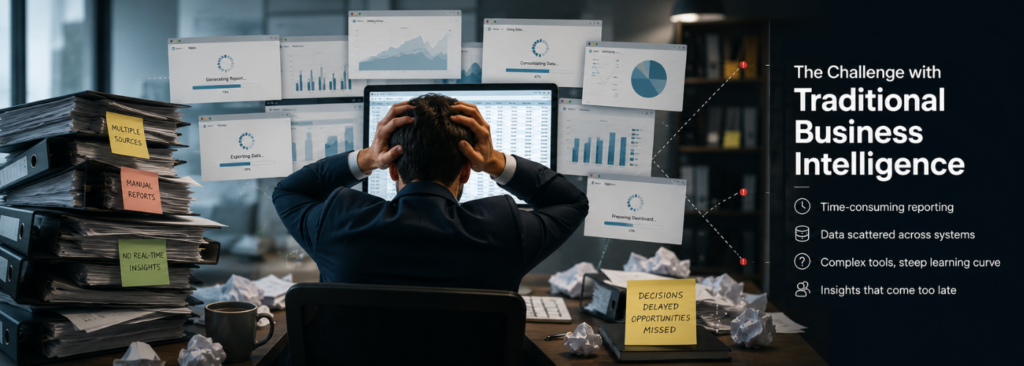
Revenue numbers may sit in an ERP. Customer activity lives in the CRM. Finance teams work with receivables and payment data. Operations has its own systems and reports. The information is there, but getting from “We have the data” to “We know what is happening” can still take hours or days.

That is where conversational business intelligence can make a difference.

Instead of waiting for a report, searching through dashboards, or asking an analyst to pull another set of numbers, leaders can ask business questions in plain language and get answers based on their organization’s data.

Cazper is built around this idea: ask questions, explore the answer, and keep digging until you understand what is happening.

Here are 10 practical business questions leaders can ask Cazper.

1. Which Customers Generated the Highest Revenue This Month?

Knowing total revenue is useful. Knowing where that revenue came from is more useful.

A leader might want to know:

Instead of manually filtering customer reports, a natural-language business intelligence assistant can help surface these answers directly from the underlying data.

This can be particularly useful for sales and revenue teams looking for changes in customer contribution.

2. What Are Our Overdue Receivables?

Cash flow can be affected by invoices that remain unpaid longer than expected.

A finance leader may need to quickly understand:

These questions often require information from financial or ERP systems.

With Cazper, authorized users can ask questions about financial performance and receivables in plain language rather than relying on a predefined report for every situation.

3. Which Products Are Underperforming?

Product performance can change for many reasons.

A product that performed well last quarter may be losing momentum. Another product may be growing faster than expected.

Instead of looking only at a dashboard showing overall sales, leaders can ask questions such as:

This ability to ask follow-up questions is an important part of conversational analytics. The goal is not simply to receive one answer, but to explore the business context behind it.

4. Are We On Track to Hit Our Revenue Target?

Revenue targets are usually discussed throughout the month, but getting a current view can involve pulling information from multiple reports.

A leader may want to know:

These questions can turn a static revenue report into a conversation about performance.

With an AI-powered business intelligence assistant, leaders can start with a broad question and then drill into the numbers that matter.

5. Which Sales Opportunities Are At Risk?

A healthy pipeline does not necessarily mean healthy future revenue.

Sales leaders may need to identify opportunities that are delayed, inactive, or showing signs of risk.

Questions could include:

For sales and RevOps teams, conversational BI can make it easier to move from pipeline data to specific questions about revenue performance.

6. How Does This Month Compare With Last Month?

How Does This Month Compare With Last Month_

“Revenue increased this month” is only the beginning of the analysis.

The next questions are usually more important:

Traditional dashboards are useful for monitoring known metrics, but business decisions often require follow-up questions that were not part of the original report.

Cazper allows users to continue the conversation and explore those questions using the same business data.

7. Which Regions or Business Units Are Underperforming?

Overall company performance can sometimes hide problems within individual regions, teams, or business units.

A leader might ask:

This kind of analysis can help leaders move from seeing a number to understanding what is behind the number.

8. Where Are Our Biggest Operational Bottlenecks?

Not every important business question is about revenue.

Operations teams may need to understand delays, order volumes, inventory, fulfilment, service activity, or other operational metrics.

The specific questions depend on the systems and data available to the organization, but the principle remains the same: business users should be able to ask questions without having to translate every question into a technical reporting request.

9. Which Customers or Products Need Attention Right Now?

Sometimes leaders do not need another monthly report. They need to know what requires attention today.

A question such as:

can lead to a much more useful conversation around:

– declining customer revenue

– overdue payments

– reduced product sales

– stalled opportunities

– unusual changes in performance

The value comes from being able to investigate the answer immediately instead of starting another reporting cycle.

10. What Should I Know About Business Performance Right Now?

What Should I Know About Business Performance Right Now_

This is a broader question, but often one of the most useful.

A business leader may not know exactly what metric to look at. They may simply want a quick understanding of what is changing across the business.

From there, the conversation can move into specific areas:

This is where conversational business intelligence moves beyond traditional reporting.

The interaction starts with a business question rather than a report name, dashboard, or SQL query.

Why Asking Better Questions Matters

Having more dashboards does not necessarily make business decisions faster.

In many organizations, the challenge is not a lack of information. It is the gap between business questions and accessible answers.

A leader may know exactly what they want to understand but still have to:

– Find the right report.

– Check whether the data is current.

– Filter the dashboard.

– Export the numbers.

– Ask for another report when the first answer raises a new question.

That process adds friction.

Conversational analytics changes the starting point. Instead of asking, “Which dashboard contains this information?”, users can ask, “What is happening with our revenue?”

They can then continue from there.

From Business Questions to Business Insights

This is the idea behind Cazper.

Cazper is an AI-powered business intelligence assistant that allows authorized users to ask questions about business data using natural language. It can work with information from systems such as ERP, CRM, finance, and operational data sources.

Users can ask a question, review the answer, and ask follow-up questions to explore the underlying business context.

Cazper is also designed with enterprise governance in mind. Access controls are enforced before queries are generated, queries are logged for auditability, and the system is read-only by design.

For organizations looking to reduce dependency on manual reporting while making business data more accessible, this provides a different way to approach business intelligence.

You can learn more about the product in Introducing Cazper: An AI-Powered Business Intelligence Assistant.

Start With the Questions That Matter

Start With the Questions That Matter

The most valuable use of AI in business intelligence does not always start with a complicated analysis.

Sometimes it starts with a simple question:

When business users can ask these questions directly against trusted business data, analytics becomes less about finding the right report and more about understanding the business.

Explore Cazper to see how conversational business intelligence can fit into your organization.

Start a Cazper Trial and explore a different way to work with business data.

FAQs

Cazper is an AI-powered business intelligence assistant that helps users ask questions about their business data in natural language. It can connect with approved business data sources and provide insights across areas such as sales, finance, and operations.

You can ask Cazper questions about revenue, customers, sales performance, receivables, products, regions, operational performance, and other business metrics available in your connected data sources. You can also ask follow-up questions to explore an insight in more detail.

Cazper helps business leaders access relevant business insights without having to rely on a separate report for every question. Instead of searching through multiple dashboards or waiting for a report, users can ask questions in natural language and explore the answers conversationally.

Yes. Cazper can support different business functions depending on the data sources and use cases connected to the platform. Finance teams can explore financial and receivables data, sales teams can analyze customers and opportunities, and operations teams can investigate operational performance.

Yes. You can start with a Cazper trial to explore the platform and understand how conversational business intelligence can work for your organization.

Start Your Self-Service Trial and explore how you can ask questions and get insights from your business data.

You can request a personalized demo to see how Cazper works and discuss your organization’s business intelligence requirements and potential use cases.

Request a Demo to speak with the Cazper team.

How Travel Analytics Is Shaping the Future of Tourism

Posted on September 23rd, 2026 by Sania Afsar

The Data Revolution Behind Every Journey

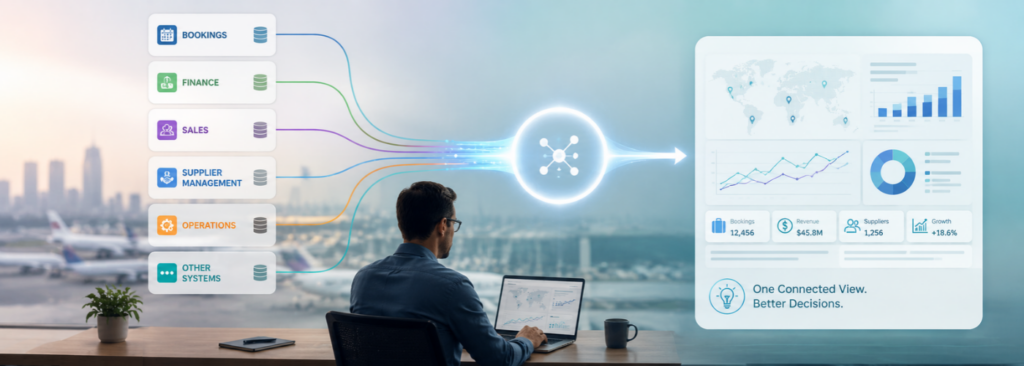
Travel businesses generate data at almost every stage of the customer and operational journey. Bookings, sales, finance, suppliers, destinations, routes, and distribution channels all create information that can help businesses understand performance and identify opportunities.

The challenge is no longer simply having access to data. It is connecting that data, understanding what it means, and turning it into better business decisions.

This is where Travel Analytics is becoming increasingly important.

Travel analytics helps airlines, hotels, travel agencies, tour operators, destination management companies, and other travel organisations bring together business information to understand performance, identify trends, improve planning, and uncover opportunities.

As data volumes continue to grow and AI changes how businesses interact with information, travel analytics is moving beyond traditional reporting towards more connected and predictive decision-making.

What Is Travel Analytics?

Travel analytics is the use of business data to understand performance, identify trends, and support decision-making across the travel and tourism industry.

Travel businesses may have information across booking platforms, CRM systems, finance applications, supplier systems, sales platforms, and operational tools. Looking at these sources separately provides only part of the picture.

Bringing this information together can help answer questions such as:

   | Which destinations and markets are generating the most bookings?

   | Which partners and channels are performing best?

   | How is revenue changing?

   | Which products or routes are performing well?

   | Are cancellations increasing?

   | What trends are likely to continue?

Travel analytics helps businesses move from “What happened?” to “Why did it happen?” and increasingly, “What could happen next?”

Why Is Travel Analytics Becoming So Important?

The travel industry does not stand still for very long. Demand changes with seasons, markets shift, routes evolve, supplier performance varies, and business conditions can change faster than expected.

For travel companies, this creates a constant need to make informed decisions quickly.

At the same time, many organisations are working with data spread across several systems. Sales may have one set of reports, finance may have another, and operations may use completely different information. Even when every team has the data it needs, bringing everything together can take time.

This is one reason Analytics in Tourism is becoming increasingly important.

The issue is often not a lack of data. It is the lack of a clear and connected view of that data.

When businesses can bring information together and make it easier to understand, teams spend less time searching for answers and more time using those answers to move the business forward.

9 Ways Travel Analytics Can Help Travel Businesses

1. Get a Clearer Picture of Business Performance

Travel businesses need to understand how different parts of the organisation contribute to overall performance.

Booking data can show transaction volumes, finance data can show revenue, sales data can reveal market performance, and supplier data can show partner contribution.

Connecting these sources gives businesses a broader view of revenue, bookings, destinations, channels, suppliers, and operations.

This can help answer questions such as:

– Which destinations are growing?

– Which markets generate the most revenue?

– Which channels perform best?

– Which partners contribute the most bookings?

The goal is not simply another dashboard. It is a clearer connection between business data and business decisions.

2. Understand Demand Before It Becomes a Problem

Travel demand is rarely consistent. Seasonality, changing customer preferences, destination popularity, and market conditions can all influence booking behaviour.

By analysing historical bookings, destination trends, and market performance, travel businesses can better understand how demand is changing.

Predictive analytics can take this further by helping organisations forecast potential demand and plan capacity, inventory, resources, and commercial strategies.

It cannot eliminate uncertainty, but it can give businesses more context when planning for what comes next.

3. Find Revenue Opportunities Hidden in the Data

Revenue opportunities may be hidden within booking patterns, destinations, products, suppliers, customer segments, or sales channels. Travel analytics can help identify these patterns.

For example, a travel company may discover that a particular destination performs better through one channel, or a hotel group may identify properties that consistently generate stronger results.

These insights can help businesses make more informed commercial decisions based on actual performance rather than assumptions.

4. Spend Less Time Looking for Answers

A simple business question can sometimes require hours of manual reporting.

A manager may want to know revenue by destination. An analyst may need to collect information from different systems, prepare the data, create a report, and then answer follow-up questions.

Modern analytics can make trusted business information easier to access and explore.

This can reduce repetitive reporting work and allow data teams to focus more on deeper analysis, data quality, and strategic initiatives.

5. Bring Disconnected Travel Data Together

Analytics should not be limited to data specialists.

Business teams need access to information that helps them understand performance and make everyday decisions.

Interactive dashboards and self-service analytics can allow teams to explore metrics such as bookings, revenue, destinations, suppliers, and sales channels without relying on a new report for every question.

The objective is not to replace analysts, but to make useful business information more accessible while allowing data teams to focus on higher-value analysis.

6. Make Data Easier for Business Teams to Use

Analytics should not be limited to data specialists.

Business teams need access to information that helps them understand performance and make everyday decisions.

Interactive dashboards and self-service analytics can allow teams to explore metrics such as bookings, revenue, destinations, suppliers, and sales channels without relying on a new report for every question.

The objective is not to replace analysts, but to make useful business information more accessible while allowing data teams to focus on higher-value analysis.

7. How AI Is Changing Travel Analytics

AI is changing how business teams interact with data.

Instead of navigating multiple dashboards or requesting a specific report, users can increasingly ask questions in natural language.

For example:

– Which destinations generated the most revenue this quarter?

– Which suppliers had the highest booking growth?

– Which markets are showing declining performance?

This can make analytics more accessible to people who do not work with data every day.

However, AI is only as useful as the data behind it. Reliable data, good governance, and well-designed analytics remain essential for trustworthy insights.

8. Move From Looking Back to Planning Ahead

Traditional reporting focuses mainly on what has already happened.

How many bookings were made? Which destination generated the most revenue? How did this quarter compare with the previous one?

These questions remain important, but travel businesses also need to understand what may happen next.

Predictive analytics can combine historical and current information to identify trends and support planning.

This can help businesses consider questions such as:

– Which destinations may see increasing demand?

– Which markets are gaining momentum?

– Where could performance decline?

– What changes should the business prepare for?

Predictive analytics does not provide certainty, but it gives businesses additional evidence and context for planning.

9. Measure B2B Travel Partnerships More Effectively

Travel is a highly interconnected industry. Airlines work with agencies and distribution partners, hotels work with travel companies and corporate partners, and tour operators depend on suppliers across multiple destinations.

With so many relationships involved, businesses need to understand which partnerships are creating the most value.

Analytics can help organisations look at partner contribution, booking volumes, revenue, destination performance, sales channels, and other business metrics to build a clearer picture of partnership performance.

This can make conversations with partners more meaningful because decisions are based on evidence rather than assumptions.

Instead of simply knowing that a partnership is performing well, a company can understand exactly where that performance is coming from and where there may still be room for improvement.

What Does the Future of Travel Analytics Look Like?

What Does the Future of Travel Analytics Look Like

The future of travel analytics is not simply about having more dashboards or collecting more data.

It is about making business information more connected, more accessible, and more useful.

We are already seeing a shift towards analytics that can bring together information from different systems, make insights easier for business teams to access, and use AI to simplify the way people interact with data.

For travel businesses, this can lead to a very different way of working.

Instead of waiting for information to be prepared, teams can access it more easily. Instead of relying on assumptions, they can use actual business data to support decisions. Instead of looking only at past performance, they can start using insights to plan ahead.

And perhaps most importantly, analytics can become part of everyday business decision-making rather than something that is used only when someone needs a report.

The Future of Tourism Will Depend on Better Decisions

Travel Analytics

The future of tourism is often discussed in terms of new destinations, new technologies, changing demand, and new ways of doing business.

But behind all of these changes is something just as important: the ability to make good decisions.

Travel companies already have access to huge amounts of information. The real opportunity lies in turning that information into something their teams can actually use.

That is why travel analytics is becoming such an important part of the industry.

It can help businesses understand performance more clearly, identify opportunities earlier, plan with greater confidence, and respond more quickly when things change.

For B2B travel organisations, the goal is not to collect data simply for the sake of having more of it. The goal is to create a clearer connection between data and business action.

Because at the end of the day, data only becomes valuable when it helps someone make a better decision.

And as the travel industry continues to evolve, that ability may become one of the biggest advantages a business can have.

Turn Your Travel Data Into Business Insights

Turn Your Travel Data Into Business Insights

Your travel business generates valuable data across bookings, sales, suppliers, destinations, finance, and operations. The real opportunity is bringing this data together to understand performance, uncover opportunities, and make better business decisions.

Mismo Systems is a Microsoft Solution Partner with over 10 years of experience helping organisations build modern data and analytics solutions. As a Microsoft Solutions Partner for Data & AI, we bring expertise in Power BI, Advanced Analytics, and AI to help businesses turn complex data into actionable insights.

From improving travel reporting and analysing booking and revenue trends to understanding supplier performance and enabling AI-powered business intelligence, we help you turn your travel data into insights your teams can act on.

Ready to get more value from your travel data?

FAQs

Travel Analytics is the process of using business data to understand performance, identify trends, and make better decisions. It can bring together data from bookings, sales, revenue, routes, suppliers, destinations, and operations to give travel businesses a clearer picture of what is happening.

Travel Analytics can help tourism businesses understand demand, track revenue, analyse routes and destinations, measure supplier and partner performance, improve operations, and identify new business opportunities. It helps teams move beyond simply looking at numbers to understanding what those numbers actually mean.

Analytics can highlight which destinations, routes, products, partners, or sales channels are performing best. By spotting these patterns, businesses can identify revenue opportunities, improve commercial planning, and focus resources where they can have the most impact.

AI makes it easier for business teams to interact with their data and get insights faster. Instead of relying only on fixed reports, teams can ask business questions in natural language and explore relevant information more easily, provided the answers are grounded in reliable business data.

The travel industry is becoming more data-driven and interconnected. As businesses deal with growing volumes of information across different systems, the ability to turn that data into clear, actionable insights will become increasingly important for better planning, faster decisions, and long-term growth.

Is Your Microsoft 365 Environment Secure? 5 Things IT Heads Need to Check

Posted on August 25th, 2026 by Sania Afsar

Microsoft 365 Isn’t Secure by Default

Microsoft 365 is one of the most widely used cloud productivity platforms, but being hosted in the cloud does not automatically mean your environment is secure.

Many organisations assume that Microsoft 365 is secure by default. While Microsoft provides powerful security capabilities, organisations are responsible for configuring and managing many of those controls correctly. A single misconfiguration such as weak identity policies, excessive external sharing, or an unmanaged device accessing sensitive data can create a significant security gap.

For IT Heads and CTOs, the question is not simply whether Microsoft 365 has security features. The real question is: Are those features correctly configured for your organisation?

5 Key Areas to Review in Your Microsoft 365 Environment

A Microsoft 365 Security Assessment can help identify gaps before they become incidents. 

Here are five areas every IT leader should review.

Microsoft 365 Security

1. Identity and Access: Is MFA Actually Enforced?

Identity is one of the most important security layers in Microsoft 365. If an attacker compromises a user’s credentials, they may gain access to email, files, Teams conversations, and other business information.

Start by checking:

– Is Multi-Factor Authentication (MFA) enforced for all users?

– Are administrators subject to stronger authentication requirements?

– Are legacy authentication methods blocked?

– Are Conditional Access policies configured and actively enforced?

– Are high-risk sign-ins and users being monitored?

– Are inactive or unnecessary accounts regularly reviewed?

Conditional Access allows organisations to apply controls based on factors such as user, device, location, application, and risk.

Simply having MFA available is not enough. IT teams need to verify that the right users, applications, and scenarios are actually covered by the policies.

2. Data Protection: Can Sensitive Information Leave Your Organisation?

Microsoft 365 contains contains some of an organisation’s most valuable information—from financial documents and customer data to contracts, employee records, and intellectual property.

Data Loss Prevention (DLP) policies can help prevent sensitive information from being accidentally or intentionally shared inappropriately.

IT Heads should check whether:

– DLP policies are configured for sensitive business information.

– Policies cover relevant Microsoft 365 workloads.

– Sensitive information types are properly identified.

– Sensitivity labels are defined and actively used.

– Users understand how to classify and handle sensitive information.

– Alerts are reviewed and acted upon.

A policy that exists but is poorly configured or rarely monitored provides limited protection. Your assessment should therefore look at both configuration and operational effectiveness.

3. External Sharing: Who Can Access Your SharePoint and Teams Data?

Collaboration is a major benefit of Microsoft 365—but it can also introduce risk.

SharePoint, OneDrive, and Teams make it easy for employees to collaborate with customers, suppliers, contractors, and other external users. Over time, however, permissions can accumulate and become difficult to track.

Ask yourself:

Do you know exactly who outside your organisation can access your Microsoft 365 data today?

Review:

– External sharing settings in SharePoint and OneDrive.

– Guest users in Microsoft Entra ID.

– External users in Teams.

– Anonymous or public sharing links.

– Expired guest accounts and unused permissions.

– Sites and Teams containing sensitive information.

IT teams should regularly review external access and remove permissions that are no longer required. The principle should be simple: users should have access to the information they need—and nothing more.

4. Email Security: Are SPF, DKIM and DMARC Properly Configured?

Email remains one of the most common entry points for cyberattacks, including phishing, spoofing, malware, and business email compromise.

Your Microsoft 365 environment should have the right email authentication and security controls in place.

Check whether:

– SPF is correctly configured for your domains.

– DKIM is enabled and configured correctly.

– DMARC is implemented and monitored.

– Microsoft Defender for Office 365 is enabled where appropriate.

– Anti-phishing and anti-spam policies are configured.

– Safe Links and Safe Attachments are being used where applicable.

– Security alerts are monitored and investigated.

SPF, DKIM, and DMARC work together to improve email authentication and reduce the risk of attackers impersonating your domain.

However, configuration alone is not enough. IT leaders should also review whether security policies are aligned with the organisation’s risk profile and whether alerts are being acted upon.

5. Device Management: Are Unmanaged Devices Accessing Your Environment?

Your Microsoft 365 security perimeter no longer ends at the office network.

Employees may access corporate email, Teams, SharePoint, OneDrive, and other Microsoft 365 services from laptops, mobile phones, home devices, and personal computers.

This creates an important question: Do you know which devices are accessing your corporate data?

Review whether:

– Devices are enrolled in Microsoft Intune where required.

– Compliance policies are defined and enforced.

– Conditional Access restricts access from risky or non-compliant devices.

– Corporate data can be protected on mobile devices.

– Lost or compromised devices can be remotely managed or wiped.

– Personal devices have appropriate access restrictions.

A user with strong authentication can still become a security risk if they access sensitive company data from an unmanaged or compromised device.

What Should IT Heads Do Next?

Microsoft 365 security is not a one-time configuration exercise. As users, devices, applications, policies, and business requirements change, security gaps can emerge over time.

A structured Microsoft 365 Assessment can provide a clearer view of your current security posture by reviewing identity, access, data protection, email security, external sharing, device management, and other critical controls.

For organisations that need ongoing monitoring, governance, and optimisation, Microsoft 365 Managed Services can also help maintain a secure and well-managed Microsoft 365 environment.

The goal is not simply to find more security settings. It is to identify the gaps that matter most, prioritise them based on risk, and give your IT team a practical path toward a stronger Microsoft 365 security posture.

FAQs

A Microsoft 365 Security Assessment reviews your organisation’s configuration, policies, and security controls to identify potential vulnerabilities and gaps. It typically covers identity and access, data protection, email security, external sharing, device management, and Microsoft 365 Security settings.

A Microsoft 365 Security assessment should be performed regularly and whenever there are significant changes to your users, devices, applications, or Microsoft 365 environment. Periodic assessments help identify configuration drift and security gaps before they become serious risks.

IT teams can review guest users, SharePoint and OneDrive sharing permissions, Teams external access, and anonymous sharing links. A security assessment can help identify outdated permissions, inactive guest accounts, and excessive access to sensitive business information.

Yes. Conditional Access can restrict Microsoft 365 access based on device compliance, user risk, location, and other conditions, while Microsoft Intune can manage and enforce device compliance policies. Together, they can help prevent unmanaged or non-compliant devices from accessing sensitive corporate resources.

Introducing Cazper: An AI-Powered Business Intelligence Assistant from Mismo Systems

Posted on July 23rd, 2026 by Sania Afsar

Why Every Business Needs an AI-Powered Business Intelligence Assistant

Businesses today generate more data than ever before. From sales and finance to operations and customer service, every department relies on data to make informed decisions. Yet despite having access to vast amounts of information, many organizations still struggle to get timely answers to their most important business questions.

Decision-makers often find themselves switching between multiple dashboards, waiting for reports, or relying on technical teams to extract the insights they need. By the time the information reaches them, the opportunity to act may already have passed.

At Mismo Systems, we think technology should make business easier, not more complicated. So, we’re happy to introduce Cazper, our new AI-powered Business Intelligence Assistant. It helps you get business insights by just talking to it, like you would with a person.

The Challenge with Traditional Business Intelligence

Business intelligence has evolved significantly over the years, but many organizations still face common challenges:

– Critical business data is spread across multiple systems.

– Teams depend on analysts or IT for custom reports.

– Dashboards answer predefined questions but often don’t address follow-up queries.

– Decision-makers spend valuable time searching for information instead of acting on it.

Modern businesses need more than reports—they need answers, delivered instantly and in context.

Meet Cazper

Cazper is an AI-powered Business Intelligence Assistant that transforms how organizations interact with their business data.

Instead of navigating multiple reports or writing complex queries, users simply ask questions in natural language and receive meaningful, real-time answers.

Whether your data resides in ERP systems, CRM platforms, finance applications, or operational databases, Cazper connects securely with your business systems to provide contextual insights that support faster and more confident decision-making.

Imagine asking questions like:

1. Which customers generated the highest revenue this month?

2. What are our overdue receivables?

3. Which sales opportunities are at risk?

4. How does this month’s performance compare with last month?

5. Which products are driving the highest revenue this quarter?

Instead of searching through dashboards, Cazper delivers the answers in seconds.

Designed for Every Business Leader

Business insights shouldn’t be limited to technical users.

Cazper is built for executives, managers, and teams who need quick access to reliable information without relying on complex reporting tools.

Whether you’re a CEO reviewing company performance, a finance leader monitoring cash flow, a sales manager tracking pipeline health, or an operations head identifying process bottlenecks, Cazper helps you make informed decisions faster.

Why Conversational Business Intelligence Matters

The way we interact with technology has changed dramatically. We ask virtual assistants for directions, search the web using natural language, and increasingly rely on AI to simplify everyday tasks.

Business intelligence is following the same path.

Instead of learning reporting tools or navigating countless dashboards, professionals can now interact with enterprise data through simple conversations. This shift—known as conversational business intelligence is making analytics more accessible across organizations.

By reducing the gap between people and data, businesses can respond faster, collaborate better, and make more informed decisions.

Why We Built Cazper

At Mismo Systems, we’ve spent years helping organizations modernize their data platforms and unlock greater value from business intelligence.

Throughout this journey, one challenge remained consistent: accessing information was often more difficult than using it.

We created Cazper to remove that barrier.

Our vision is simple to enable every business user, regardless of technical expertise, to access trusted business insights through natural conversations. By making analytics intuitive and accessible, Cazper empowers organizations to spend less time searching for data and more time making decisions that drive growth.

Discover Cazper

Cazper represents the next step in how businesses interact with their data combining the power of artificial intelligence with the simplicity of natural language.

If you’re looking to reduce dependency on manual reporting, accelerate decision-making, and make business intelligence more accessible across your organization, Cazper is built for you.

To learn more about Cazper, explore its capabilities, or request a personalized demonstration, visit the Cazper website and discover how conversational AI is transforming business intelligence.

FAQs

An AI-Powered Business Intelligence Assistant is a conversational AI solution that helps users access business insights using natural language. Instead of creating reports or navigating dashboards, users simply ask questions and receive real-time, data-driven answers.

Conversational business intelligence allows users to interact with business data using natural language instead of traditional dashboards or reports. It makes analytics more accessible, helping users find answers quickly and make data-driven decisions.

Cazper provides instant access to trusted business data, reducing the need for manual reporting and dependency on technical teams. This enables leaders to make faster, more informed decisions based on real-time insights.

Cazper integrates securely with a wide range of enterprise systems, including ERP, CRM, finance applications, data warehouses, and operational databases, allowing users to access insights from multiple data sources in one place.

Azure AI, ML Studio & OpenAI: Simplifying Microsoft’s AI Ecosystem

Posted on August 5th, 2024 by Sania Afsar

In today’s rapidly evolving technological landscape, integrating artificial intelligence (AI) and machine learning (ML) into business operations is no longer a luxury but a necessity. Microsoft’s Azure platform offers a suite of robust AI and ML services designed to empower developers and businesses to build intelligent applications seamlessly. In this article, we delve into three core components of Azure’s AI offerings: Azure AI, Azure Machine Learning Studio, and Azure OpenAI, exploring their features, use cases, and real-world applications.

Azure AI

Azure AI is a comprehensive suite of AI services and cognitive APIs designed to help developers integrate intelligent features into their applications without the need for extensive AI expertise. These services include pre-built models for tasks such as vision, speech, language, and decision-making.

Use Cases:

  • Image Recognition: Companies can use Azure AI’s computer vision capabilities to develop applications that can identify and classify images, making it ideal for security systems, inventory management, and quality control in manufacturing. For instance, a retail business could use image recognition to monitor stock levels and automatically reorder products when inventory is low.
  • Speech-to-Text: Azure AI’s speech recognition can be leveraged to transcribe customer service calls, enabling businesses to analyze interactions and improve customer satisfaction. This is particularly useful in call centers where monitoring and evaluating numerous calls manually is impractical.
  • Anomaly Detection: Financial institutions can utilize Azure AI to detect fraudulent transactions in real-time by identifying patterns and anomalies in transaction data, thus enhancing security and reducing the risk of fraud.

Azure Machine Learning Studio

Azure Machine Learning Studio is a cloud-based environment that supports the end-to-end machine learning workflow, from data preparation to model deployment. It caters to both beginners and advanced users, providing a platform for developing, training, testing, and deploying ML models.

Use Cases:

  • Predictive Maintenance: Manufacturing companies can use Azure ML Studio to build models that predict equipment failures before they happen. By analyzing sensor data and historical maintenance records, businesses can schedule timely maintenance, reducing downtime and operational costs.
  • Customer Segmentation: Marketing teams can leverage Azure ML Studio to segment customers based on purchasing behavior and preferences. This enables personalized marketing strategies that enhance customer engagement and drive sales.
  • Healthcare Diagnostics: Healthcare providers can develop ML models to assist in diagnosing diseases by analyzing medical images and patient data. For example, an ML model can be trained to detect early signs of diseases like cancer from radiology images, improving early detection and treatment outcomes.

Azure OpenAI

Azure OpenAI provides access to powerful language models developed by OpenAI, such as GPT-3. These models are particularly suited for tasks involving natural language understanding and generation.

Use Cases:

  • Chatbots and Virtual Assistants: Businesses can use Azure OpenAI to create sophisticated chatbots and virtual assistants that can handle complex customer interactions. These bots can understand and respond to queries in a human-like manner, improving customer service and operational efficiency.
  • Content Creation: Media companies can utilize Azure OpenAI to automate content creation, such as generating news articles, marketing copy, or even creative writing. This can significantly reduce the time and resources required for content production.
  • Code Generation: Developers can benefit from Azure OpenAI’s capabilities to generate code snippets or complete functions based on natural language descriptions. This can streamline the software development process, allowing developers to focus on higher-level design and problem-solving tasks.

Conclusion

Azure’s AI and ML services provide powerful tools for technologists and business users to develop intelligent applications that enhance operational efficiency, improve customer experience, and drive innovation. By leveraging Azure AI, Machine Learning Studio, and OpenAI, businesses can stay ahead in the competitive landscape, harnessing the full potential of AI and ML technologies.

Why Migrate Legacy Applications to Containers and What are the Challenges this Brings?

Posted on August 5th, 2024 by Sania Afsar

Introduction to Containerization

Containerization is the era to welcome: a time where complexity would confront simplicity in the field of deploying software. The basic idea is to have software packed into lightweight independent units, which are named containers. Each container has everything it needs to run: code, runtime, system tools, libraries, and settings.

This approach is fundamentally different from the classical ways of deployment, when applications used to run directly onto physical servers or virtual machines, being mixed with the underlying operating system. The concept of containers is not new, but adaptation has exploded with the popularity of platforms such as Docker and Kubernetes, making it more comfortable now to create, deploy, and manage at scale.

The benefits of the approach using containers over traditional approaches are many, but what it all really boils down to, in basic essence, amounts to several very important points: portability, efficiency, scalability, and isolation that provides far more resiliency and manageability in deployment environments.

The Benefits of Migrating to Containers

  • Scalability: One of the best benefits of containers is their scalability feature. The ability to scale up and down containers is very easy, as this can be comfortably done in case of demand changes. For example, when there is an e-commerce website that normally gets increased traffic due to the holiday season, the website may automatically increase the number of its pools of containers through container orchestration tools. After that period, scaling back would optimize resource utilization and cost.


  • Consistency According to Environment: The container provides a consistent environment for the application from development through testing to production. It removes the “it works on my machine” syndrome. A leading global financial services firm, for example, put in place containers that harmonized their development and production environments and cut deployment failures and rollbacks by 90%.


  • Efficiency and Speed: Containers offer very high efficiency as they share the kernel system of the host and have very fast startup times compared to that of a virtual machine. This efficiency translates into faster deployment cycles and hence more agile response to changes. An example is the leading telecommunications provider that has reduced their deployment times from hours to minutes through containerizing their applications, hence ensuring that they can roll out features more frequently.

Why Now?

The digital shift has been toward transformation by way of containerization, not an option but rather a requirement for most sectors. With cloud computing dominating the atmosphere and pressure coming down heavily on business to provide quick services and remain agile, containers provide a solution to keep one’s head above water and at the same time not fall behind.

And the microservices architectures have already seen their growing adoption and complement the container deployment; since it offers the perfect runtime environment for microservices by isolating each other and dealing smoothly with their interactions.

The risks in retaining legacy systems—such as higher operational cost and more vulnerability to security, not forgetting difficulties in integration with modern technologies—all press for a business to rethink infrastructure strategy. They are a drag to agility and innovation, as they lock an organization into old processes, hence hindering the growth of the processes and adaptation to changes that might be happening in the market.

Challenges faced when moving to new architectures like Containers

When companies embark on the journey to migrate their legacy resources to modern technologies like containers, they often encounter a range of technical challenges. These challenges can vary widely depending on the specific legacy systems in place, but common issues include:

Container Compatibility

  • Issue: Many legacy applications are not designed to be containerized. They may rely on persistent data, specific network configurations, or direct access to hardware that doesn’t naturally fit the stateless, transient nature of containers.
  • Technical Insight: Containers are best suited for applications designed on microservices architecture, where each service is loosely coupled and can be scaled independently. Legacy applications often have a monolithic architecture, making them difficult to decompose into container-ready components without significant refactoring.

Data Persistence

  • Issue: Containers are ephemeral and stateless by design, which means they don’t maintain state across restarts. Legacy applications, however, often depend on a persistent state, and adapting them to a stateless environment can be complex.
  • Technical Insight: Solutions involve configuring persistent storage solutions that containers can access, such as Kubernetes Persistent Volumes or integrating with cloud-native databases that provide resilience and scalability.

Network Configuration

  • Issue: Legacy applications frequently have complex networking requirements with hardcoded IP addresses and custom networking rules that are incompatible with the dynamic networking environment of containers.
  • Technical Insight: Migrating such systems to containers requires the implementation of advanced networking solutions in Kubernetes, such as Custom Resource Definitions (CRDs) for network policies, Service Mesh architectures like Istio, or using ingress controllers to handle complex routing rules.

Dependency Management

  • Issue: Legacy systems often have intricate dependencies on specific versions of software libraries, operating systems, or other applications. These dependencies may not be well-documented, making it challenging to replicate the exact environment within containers.
  • Technical Insight: This issue can be addressed by meticulously constructing Dockerfiles to replicate the needed environment or by using multi-stage builds in Docker to isolate different environments within the same pipeline.

Security Concerns

  • Issue: Migrating to containers can expose legacy applications to new security vulnerabilities. Containers share the host kernel, so vulnerabilities in the kernel can potentially compromise all containers on the host.
  • Technical Insight: To mitigate these risks, use container-specific security tools and practices such as seccomp profiles, Linux capabilities, and user namespaces to limit privileges. Regular scanning of container images for vulnerabilities is also critical.

Scalability and Performance Tuning

  • Issue: While containers can improve scalability, legacy applications might not automatically benefit from this scalability without tuning. Performance issues that weren’t visible in a monolithic setup might emerge when the application is split into microservices.
  • Technical Insight: Profiling and monitoring tools (e.g., Prometheus with Grafana) should be used to understand resource usage and bottlenecks in a containerized environment. This data can drive the optimization of resource requests and limits in Kubernetes, ensuring efficient use of underlying hardware.

Cultural and Skill Gaps

  • Issue: Technically, the shift also requires a cultural shift within IT departments. Legacy systems often are maintained by teams not familiar with DevOps practices, which are essential for managing containerized environments.
  • Technical Insight: Implementing training programs and gradually building a DevOps culture are necessary steps. This might include cross-training teams on container technologies, continuous integration (CI), and continuous deployment (CD) practices.

Regulatory and Compliance Challenges

  • Issue: Legacy applications in regulated industries (like finance or healthcare) might have specific compliance requirements that are difficult to meet in a dynamically scaled container environment.
  • Technical Insight: Careful planning is needed to ensure that containers are compliant with regulations. This might involve implementing logging and monitoring solutions that can provide audit trails and ensuring that data protection practices are up to standard.

Initial Considerations

Before bounding down this path of containerization, check what you have and your application portfolio in order to find those candidates that can move. Of course, not every application is perfectly suitable for a containerized environment, with legacy applications often requiring quite a bit of heavy modification to fit into one—it might not be the best candidate at the very start. This review should include the app dependencies, the network configurations, and how to scale them. The details will be covered in our upcoming post, which is going to be about planning and tool selection required for a smooth transition